
Introduction
Modern technology has made life easier, but it has also created a growing health problem known as Tech neck. Hours spent looking down at smartphones, laptops, and tablets can strain your neck, shoulders, and upper back, leading to pain that may worsen over time. Fortunately, Tech necks are often preventable with better posture, regular movement, and simple exercises.
Tech neck refers to neck and upper back pain caused by repeatedly looking down at phones, tablets, or computers for extended periods. Common symptoms include neck stiffness, headaches, shoulder pain, and reduced mobility. Most cases improve with better posture, stretching, ergonomic adjustments, and regular breaks, while a healthcare professional should evaluate severe or persistent pain.
What Is Tech Neck?
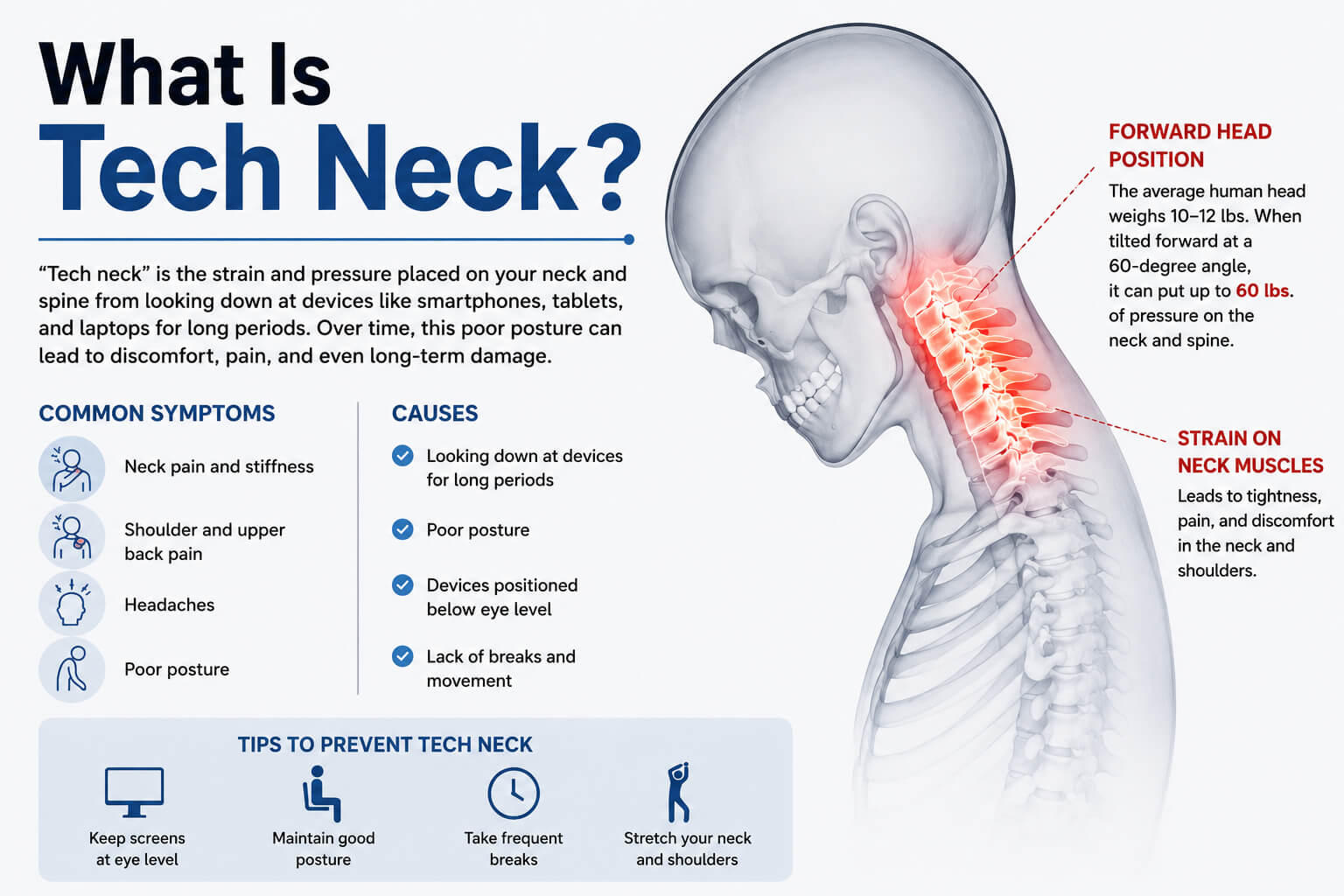
Tech neck is a modern term used to describe pain, stiffness, and discomfort in the neck, shoulders, and upper back caused by prolonged use of digital devices.
Although the condition isn’t an official medical diagnosis, healthcare professionals widely recognize the posture-related problems associated with it. It develops when your head stays tilted forward for extended periods while using a smartphone, laptop, tablet, or even reading.
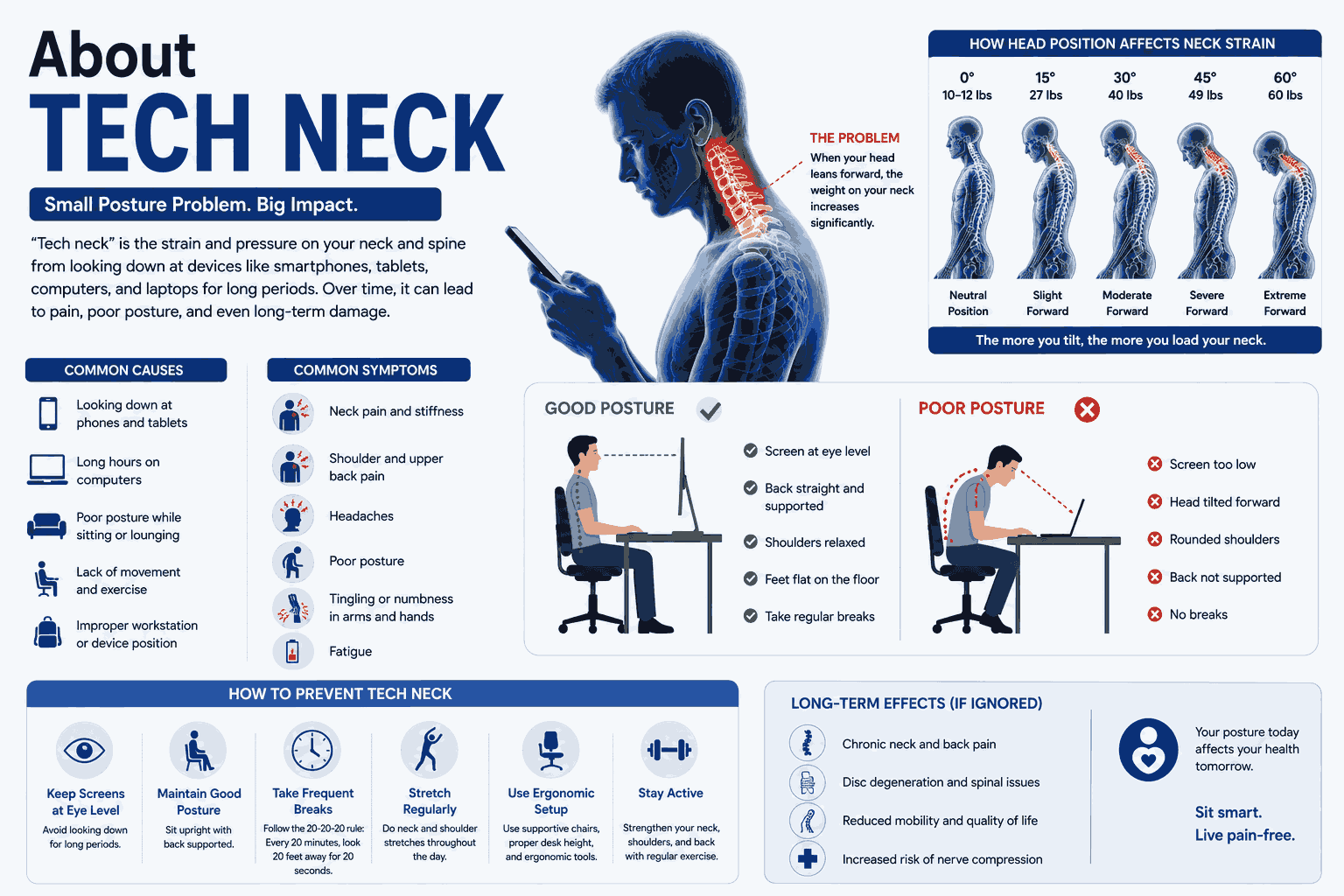
The human head weighs about 10 to 12 pounds (4.5 to 5.5 kg) in a neutral position. However, research by spine surgeon Dr. Kenneth Hansraj found that the force on the cervical spine increases dramatically as the head tilts forward. At a 60-degree angle, the neck may experience approximately 60 pounds (27 kg) of force.
This extra strain explains why so many people experience neck pain after scrolling social media or working on a computer all day.
Why Is Tech Neck Becoming More Common?
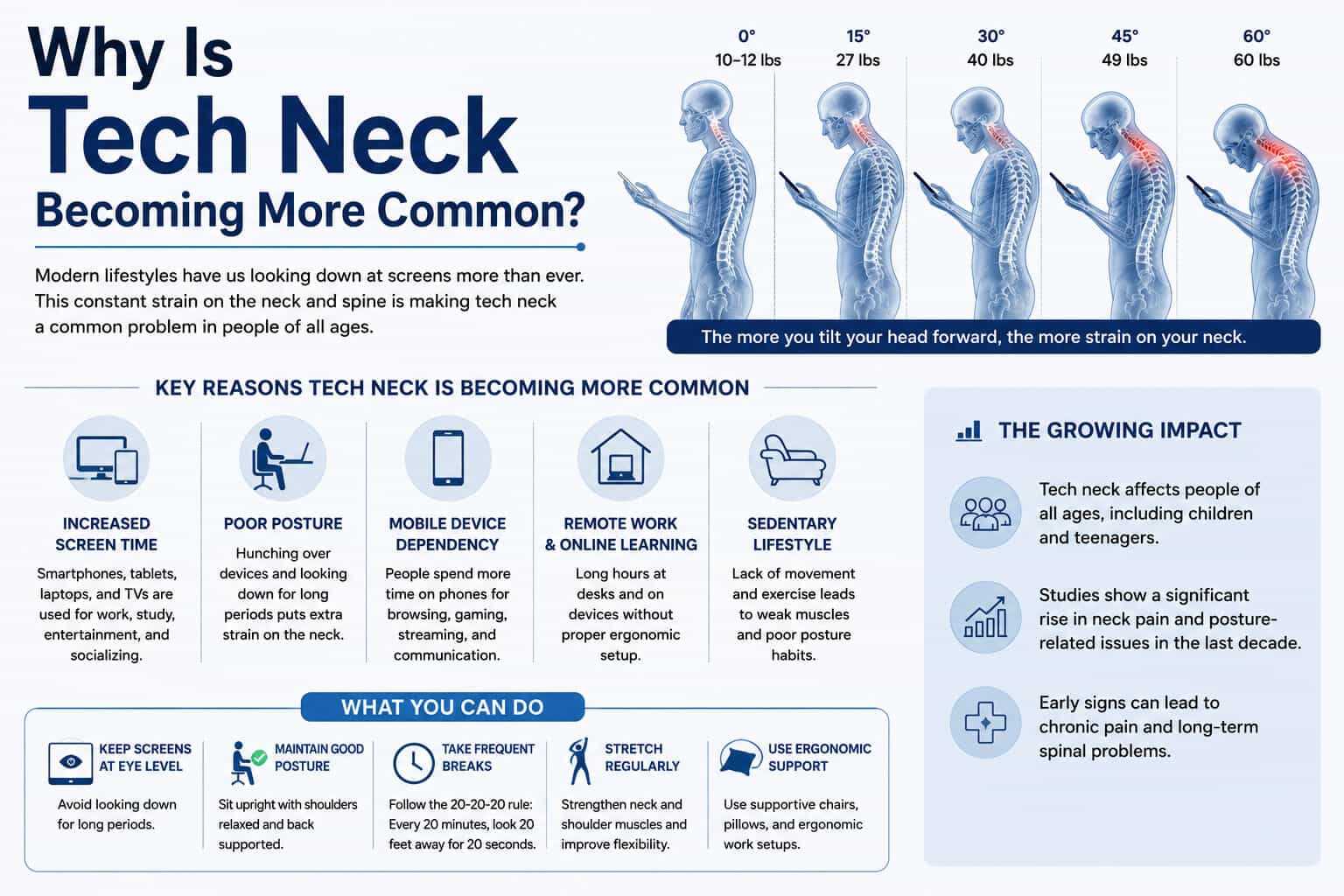
Technology is now part of everyday life.
Most people spend hours each day:
- Using smartphones
- Working on computers
- Attending online meetings
- Watching videos
- Gaming
- Reading on tablets
According to DataReportal’s 2025 Digital Global Overview Report, internet users spend over 6 hours online each day on average worldwide, with a significant portion of that time spent on mobile devices.
More screen time often means more time with poor posture.
Children, teenagers, office workers, remote employees, gamers, and even older adults are all increasingly affected.
What Causes Tech Neck?
Tech neck usually develops because muscles and joints remain under constant stress.
Common causes include:
Looking Down at Your Phone
This is the biggest contributor.
Many people hold their phones below chest level, forcing the neck into a forward-bent position.
Poor Computer Ergonomics
Working with a monitor that’s too low causes the head to lean forward throughout the day.
Sitting for Long Periods
Remaining in one position reduces blood flow and increases muscle fatigue.
Weak Neck and Core Muscles
When supporting muscles are weak, the neck carries more of the workload.
Lack of Movement
Even good posture becomes uncomfortable if maintained for hours without breaks.
Common Symptoms of Tech Neck
Symptoms often begin gradually.
Many people notice discomfort after long workdays or extended phone use.
Neck Pain
A dull ache or sharp pain is the most common complaint.
Shoulder Tightness
The upper trapezius muscles often become tense from supporting poor posture.
Upper Back Pain
Muscles between the shoulder blades can become sore from prolonged forward rounding.
Headaches
Tension headaches frequently begin at the base of the skull and spread toward the forehead.
Reduced Neck Mobility
Turning your head may become uncomfortable or feel restricted.
Tingling or Numbness
In more serious cases, irritated nerves may cause tingling in the arms or hands.
How Can You Tell If You Have Tech Neck?
You may have tech neck if you notice:
- Pain after using your phone
- Neck stiffness every morning
- Rounded shoulders
- Forward head posture
- Frequent headaches
- Tight muscles between the shoulders
- Pain that improves after stretching
A simple self-check:
Stand sideways in front of a mirror.
If your ears sit noticeably in front of your shoulders instead of lining up with them, you may have forward head posture—a common sign associated with tech neck.
Who Is Most at Risk?
Almost anyone who regularly uses digital devices can develop tech neck.
Higher-risk groups include:
- Office workers
- Students
- Software developers
- Graphic designers
- Remote employees
- Gamers
- Social media creators
- Healthcare professionals completing electronic records
- Drivers using navigation devices
Children deserve special attention because their muscles and posture are still developing.
Does Tech Neck Cause Permanent Damage?
Usually not.
Most cases improve significantly with posture correction and exercise.
However, ignoring symptoms for months or years may contribute to:
- Chronic muscle tension
- Joint stiffness
- Reduced flexibility
- Disc irritation
- Cervical spine degeneration associated with aging
- Persistent headaches
Pain lasting several weeks or accompanied by numbness, weakness, or loss of coordination should be evaluated by a healthcare professional.
How Is Tech Neck Diagnosed?
Doctors typically diagnose tech neck through:
- Medical history
- Physical examination
- Posture assessment
- Neck movement evaluation
Imaging tests like X-rays or MRI scans are usually unnecessary unless symptoms suggest nerve compression, injury, or another medical condition.
Best Treatments for Tech Neck
Most people improve without surgery.
Treatment focuses on reducing muscle strain and restoring normal movement.
1. Improve Your Posture
Keep your:
- Head directly above your shoulders
- Chin slightly tucked
- Shoulders relaxed
- Back supported
Good posture distributes weight evenly across the spine.
2. Raise Your Screen
Whether using a laptop or desktop:
- Place the top of the monitor near eye level.
- Sit close enough that you don’t lean forward.
- Use a laptop stand with an external keyboard if needed.
For phones, raise the device closer to eye level instead of lowering your head.
3. Take Regular Movement Breaks
Many experts recommend the 20-20-20 rule for reducing eye strain, but movement is equally important.
Every 20–30 minutes:
- Stand up
- Stretch
- Walk briefly
- Roll your shoulders
Even one minute of movement helps reduce muscle fatigue.
4. Stretch Tight Muscles
Helpful stretches include:
Chin Tucks
Strengthens deep neck muscles while correcting forward head posture.
Upper Trapezius Stretch
Relieves tight shoulders.
Levator Scapula Stretch
Targets muscles connecting the neck and the shoulder blade.
Chest Stretch
Counteracts rounded shoulders caused by prolonged sitting.
Hold stretches for 20–30 seconds without bouncing.
5. Strengthen Supporting Muscles
Strength exercises help prevent recurring pain.
Focus on:
- Upper back
- Core
- Shoulder stabilizers
- Deep neck flexors
Resistance bands work well for beginners.
6. Apply Heat or Ice
Heat helps relax tight muscles.
Ice may reduce inflammation after prolonged strain.
Many people benefit from alternating both.
7. Massage Therapy
Massage may reduce muscle tightness and improve comfort, especially when combined with posture changes and exercise.
8. Physical Therapy
Persistent symptoms often improve with guided rehabilitation.
A physical therapist may create an individualized program including:
- Manual therapy
- Mobility exercises
- Strengthening
- Ergonomic education
Best Exercises for Tech Neck
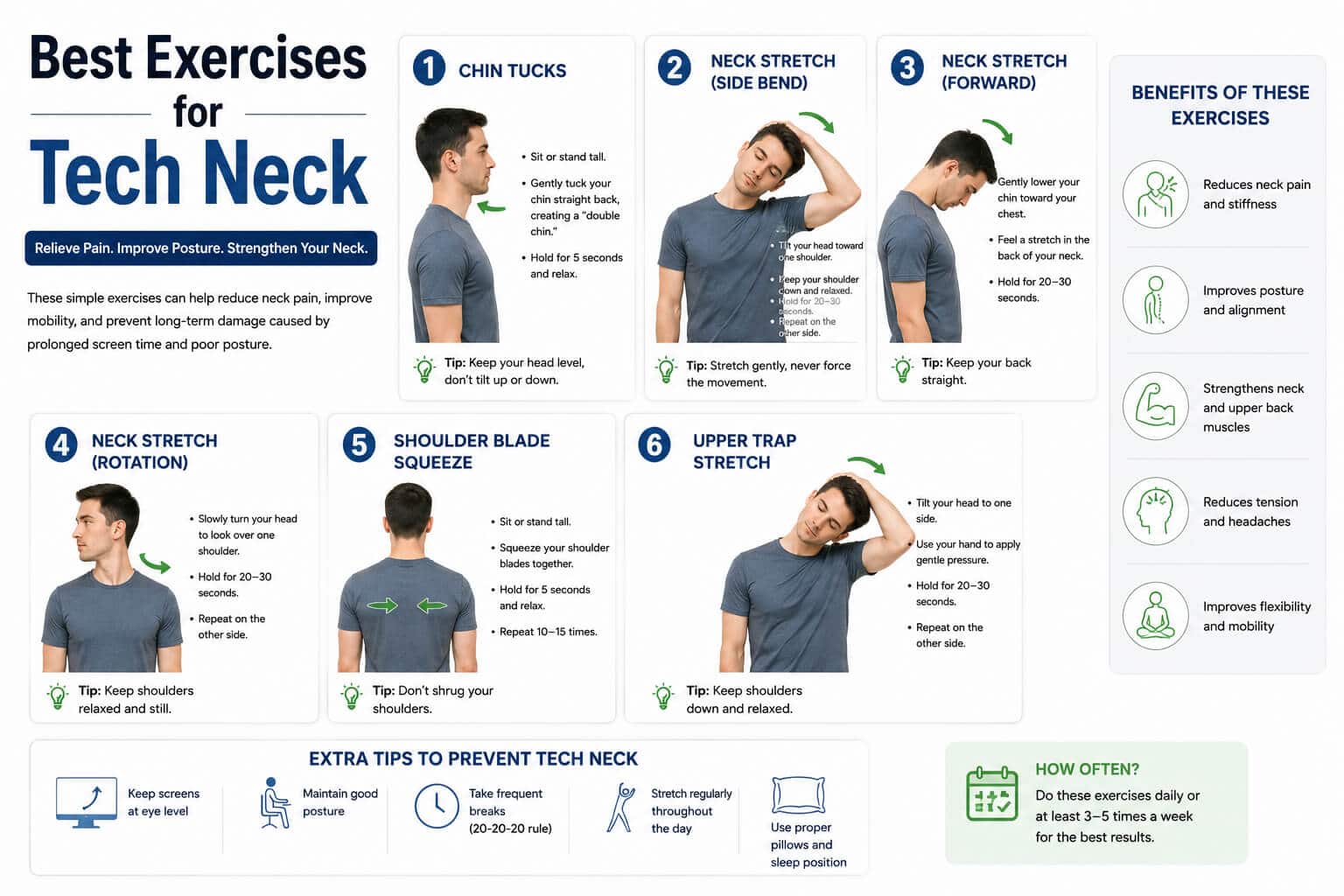
These exercises require little equipment.
Chin Tucks
- Sit upright.
- Pull your chin straight backward.
- Hold for five seconds.
- Repeat 10 times.
Shoulder Blade Squeezes
- Sit tall.
- Pull shoulder blades together.
- Hold for five seconds.
- Repeat 10–15 times.
Wall Angels
Stand against a wall.
Slowly move your arms upward while keeping your back flat.
Repeat 10 times.
Doorway Chest Stretch
Place both arms on a doorway.
Lean forward gently until you feel a stretch across the chest.
Hold 30 seconds.
Cat-Cow Stretch
This yoga movement improves spinal mobility while reducing stiffness throughout the back.
How to Prevent Tech Neck
Preventing tech neck is easier than treating chronic pain.
Follow these habits every day:
Keep Devices at Eye Level
Avoid bending your neck downward.
Limit Continuous Screen Time
Stand up at least once every 30 minutes.
Improve Your Workspace
A supportive chair and properly positioned monitor make a significant difference.
Exercise Regularly
Strength training helps maintain a healthy posture.
Sleep with Proper Support
Choose a pillow that keeps your neck aligned with your spine.
Avoid Holding Your Phone Between Your Ear and Shoulder
Use headphones or speaker mode instead.
Tech Neck in Children and Teenagers
Young people spend more time on screens than ever before.
Online learning, gaming, texting, and streaming all contribute to prolonged forward head posture.
Parents can help by encouraging:
- Outdoor play
- Regular stretching
- Screen breaks
- Proper study setups
- Limited recreational screen time
Teaching healthy habits early may reduce long-term problems.
Tech Neck and Remote Work
Remote work has permanently changed how millions of people spend their day.
Many home offices still include:
- Kitchen tables
- Sofas
- Beds
- Dining chairs
These setups often encourage poor posture.
A few affordable upgrades can help:
- Laptop stand
- External keyboard
- Adjustable chair
- Footrest
- Monitor riser
Small ergonomic improvements can reduce daily strain.
Can Exercise Completely Cure Tech Neck?
Exercise is highly effective, but it works best alongside better habits.
If you continue spending eight hours a day looking down at your phone, exercise alone may not solve the problem.
The best results come from combining:
- Better posture
- Ergonomic improvements
- Frequent movement
- Strength training
- Stretching
- Healthy screen habits
When Should You See a Doctor?
Seek medical attention if you experience:
- Pain lasting several weeks
- Severe headaches
- Arm weakness
- Numbness or tingling
- Loss of balance
- Pain after an accident
- Difficulty controlling your hands
These symptoms may indicate conditions beyond simple muscle strain.
About Tech Neck
Only Older Adults Get Tech Neck
False.
People of all ages—including teenagers—can develop posture-related neck pain.
Cracking Your Neck Fixes It
Temporary relief doesn’t address the underlying muscle imbalance or posture problem.
Better Posture Means Sitting Perfectly Still
Even perfect posture becomes stressful if maintained too long.
Movement matters just as much.
Expensive Ergonomic Equipment Solves Everything
Good habits are more important than expensive furniture.
Even the best chair cannot replace regular movement.
Frequently Asked Questions
Is tech neck permanent?
No. Most cases improve with posture correction, stretching, strengthening exercises, and reducing prolonged screen time. Long-standing untreated cases may take longer to recover.
How long does tech neck take to heal?
Mild cases often improve within a few weeks of consistent posture changes and exercise. More severe or chronic cases may require several months and professional treatment.
What is the fastest way to relieve tech neck pain?
The quickest relief usually comes from resting strained muscles, applying heat or ice, stretching gently, improving posture, and taking frequent breaks from screens.
Can sleeping cause tech neck?
Poor sleeping positions and unsupportive pillows can worsen neck pain, but tech neck is primarily caused by prolonged forward head posture during device use.
Does tech neck affect headaches?
Yes. Tight muscles at the back of the neck and shoulders can contribute to tension headaches that often improve when posture and muscle balance are restored.
Key Takeaways
Tech neck has become one of the most common posture-related problems in our increasingly digital world. While the condition can cause persistent discomfort, it is often reversible with consistent attention to posture, movement, and strengthening exercises. Raising your screens, taking regular breaks, and maintaining an ergonomic workspace can dramatically reduce strain on your neck and shoulders. The earlier you address the warning signs, the easier it is to prevent short-term stiffness from becoming long-term pain, allowing you to stay productive and comfortable while using technology every day.