
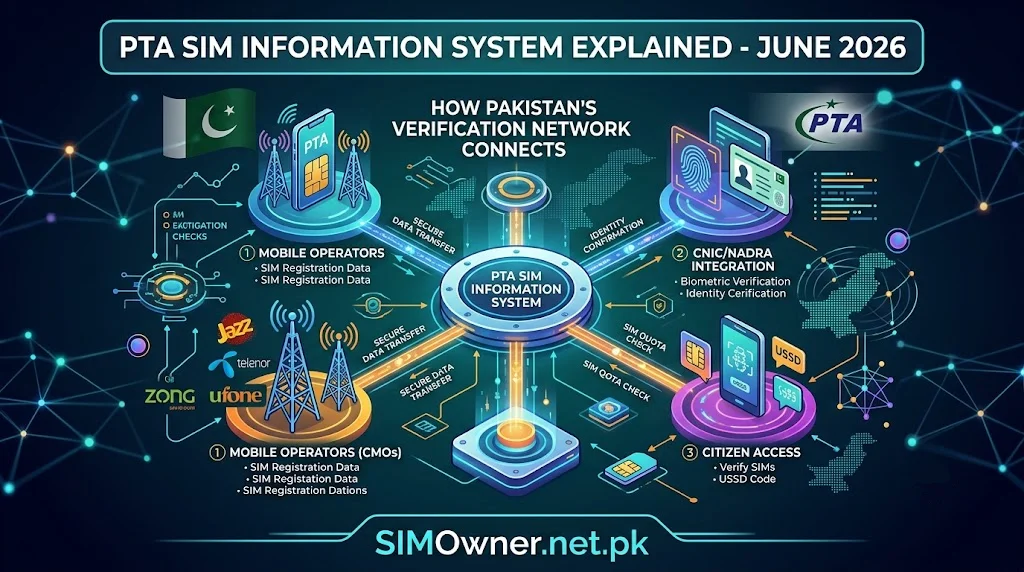
Pakistan’s mobile network is built on a single rule: no SIM can be activated without matching the buyer’s fingerprint to their CNIC through NADRA’s biometric database. This process, generally referred to as CNIC SIM verification, is what allows every citizen to look up which SIM owner details are registered against their own identity — and it’s also the reason unauthorized SIM registration, while it does happen, can usually be traced and corrected. This guide explains how the verification system actually works behind the scenes, and how to use it to check, confirm, and correct your own SIM records.
How Biometric SIM Registration Works
When someone buys a new SIM in Pakistan, the process happens at a licensed franchise or retail outlet:
- The buyer presents their original CNIC.
- Their fingerprint is scanned and matched in real time against NADRA’s biometric database.
- Once the match is confirmed, the operator activates the SIM and logs the subscriber’s name, CNIC number, and activation date in its own system.
- That record is then reflected in PTA’s cross-operator verification tools, which is what powers the SMS and web-based checks described below.
Because the match happens against NADRA’s live database rather than a static photocopy, this system is significantly harder to defeat than older paper-based registration was. That said, it isn’t foolproof — fraud can still occur through stolen CNIC documents, forged paperwork, or, less commonly, compromised franchise staff, which is exactly why individual verification checks remain worthwhile even in a biometric system.
Checking Your SIM Owner Details: The Official Methods
SMS Code 668
Send your 13-digit CNIC (no dashes) as a plain text message to 668. The reply lists the total number of SIMs registered to your CNIC, broken down by operator. This is the standard first step PTA recommends for anyone checking their own registration status.
SMS “MNP” to 667
This checks the specific SIM currently in your phone — send the text MNP to 667, and you’ll receive the registered owner name and a masked CNIC for that connection. Useful when you’ve bought a second-hand phone or SIM and want to confirm who it’s actually registered to before relying on it.
cnic.sims.pk Online Portal
The web equivalent of the 668 service. Enter your CNIC number and the portal displays your registered SIM count across networks, along with activation dates — helpful when you need a record you can screenshot or print for a franchise visit or a formal complaint.
Operator Biometric Verification Status
Beyond counting SIMs, you can separately confirm whether a specific connection has completed biometric verification:
- Jazz: SMS your CNIC to 6001, or check via the My Jazz app.
- Zong: SMS “V” to 7911.
- Telenor: Send a blank SMS to 7751.
- Ufone: Dial *336# and follow the verification prompt.
An “unverified” status typically means the original registration never completed the biometric match correctly, and operators may restrict or eventually suspend such connections until re-verification is completed at a franchise.
Reading Your Results Correctly
When your 668 reply comes back, you’re essentially looking at an audit of your own telecom footprint. A few things to check:
- Does the operator breakdown match SIMs you actually use? If you see a Zong connection and you’ve never had a Zong SIM, that’s worth investigating.
- Does the count match old SIMs you forgot about? It’s common to have an old, unused SIM still counted against your CNIC — this isn’t fraud, but it does count toward your registration limit, so it’s worth formally disowning connections you no longer use.
- Is the activation date recent and unfamiliar? A SIM activated on a date you don’t recognize is the clearest sign of unauthorized registration.
Correcting Unauthorized Registrations
If you find a SIM you didn’t register:
- Visit the relevant network’s franchise with your original CNIC.
- Request a formal disownership of the specific SIM number.
- Ask for written or SMS confirmation of the request being filed.
- Recheck via 668 or the portal after a short waiting period to confirm removal.
- If the franchise delays or refuses, escalate to PTA directly, since PTA holds final regulatory authority over operator compliance with SIM registration rules.
Why the CNIC Holder Bears Responsibility
Under Pakistani telecom regulation, whoever’s CNIC a SIM is registered against is generally treated as legally responsible for the activity on that connection. This is precisely why the verification system exists in the form it does — it shifts the burden onto individuals to actively confirm their own registration status rather than leaving enforcement entirely reactive. Practically speaking, this means a monthly 668 check costs nothing and takes seconds, but skipping it for months at a time is what allows an unauthorized registration to sit unnoticed.
Avoiding Unofficial “SIM Database” Websites
A recurring pattern across dozens of similar-sounding websites is the promise of searching any phone number to instantly reveal the owner’s name, address, or live location. None of these tools have legitimate access to PTA’s subscriber database, and entering someone’s number — or worse, your own CNIC — into such a site typically just hands your data to whoever runs it. The verification methods listed above (668, 667, and cnic.sims.pk) are the only channels tied to PTA’s actual infrastructure, and they only ever return data about your own CNIC or the SIM physically in your hand.
Readers who want a consolidated reference for CNIC-linked SIM data, including a breakdown of NADRA’s biometric verification role and step-by-step screenshots for the checks above, can find an updated walkthrough on the CNIC Information page at SimsOwner.pk, alongside a broader SIM database overview on the same site.
Frequently Asked Questions
What’s the difference between checking via 668 and checking via 667? 668 counts all SIMs registered to your CNIC across every operator. 667 (via the “MNP” SMS) verifies only the specific SIM currently in your phone.
Can biometric verification still fail even after a fingerprint match? Rarely, but data sync issues between an operator’s system and NADRA’s database can cause a legitimately registered SIM to show as unverified. If this happens, a franchise visit typically resolves it.
Does CNIC SIM verification apply to prepaid and postpaid connections equally? Yes, both connection types go through the same biometric registration process at activation.
Can I check SIM registrations for a family member’s CNIC? Only with their explicit consent and typically in person at a franchise with their original CNIC — you cannot do this remotely via SMS on their behalf.
Is there a cost for any of these verification methods? No, 668, 667, and the cnic.sims.pk portal are all free official services.
The Technical Side: How Biometric Matching Actually Works
NADRA’s Multi-Finger Biometric Verification System (MBVS) stores fingerprint templates collected when citizens apply for or renew their CNIC. When a SIM is purchased, the franchise’s verification device scans the buyer’s fingerprint and sends it, along with the CNIC number entered, to NADRA’s system for a real-time match. If the fingerprint matches the stored template for that CNIC, the franchise device receives an approval response, and the operator’s system logs the SIM as biometrically verified. If there’s no match — because of a data entry error, a genuinely different person, or a damaged/unreadable fingerprint — the activation is rejected at the point of sale, or in some documented cases, flagged for manual review. This is a meaningfully different process from the older photocopy-based system, where a franchise employee simply had to visually confirm a CNIC number matched a form, with no independent verification against a national database at all.
Comparing the Three Core Verification Channels
| Channel | Best For | Requires Internet | Output |
|---|---|---|---|
| SMS to 668 | Full cross-network SIM count on your CNIC | No | Per-operator SIM count |
| SMS “MNP” to 667 | Verifying the specific SIM in your phone | No | Registered name + masked CNIC |
| cnic.sims.pk portal | Printable/documented record, overseas access | Yes | Full breakdown with activation dates |
Each channel pulls from the same underlying registration data, so the choice between them usually comes down to convenience rather than accuracy — use 668 for a quick check, the portal when you need a saved record, and 667 when you specifically want to confirm ownership of a SIM physically in front of you.
What Counts as “Unauthorized” vs. “Forgotten”
Not every unexpected entry in your 668 results is fraud. It’s worth distinguishing between two very different situations:
Forgotten registrations — SIMs you personally activated at some point (a short-term connection for a trip, a SIM bought for a now-broken phone, a promotional data SIM) that you simply stopped using without formally disowning. These aren’t a security threat, but they do occupy your registration quota and are worth cleaning up.
Genuinely unauthorized registrations — SIMs activated by someone else using your CNIC without your knowledge, typically through a stolen or forged copy of your identity document. These require urgent action: franchise visit, disownership request, and — if the SIM shows signs of having been used for financial fraud or other crime — a formal report to PTA or the relevant law enforcement cybercrime unit.
The distinction matters because treating every unfamiliar entry as an emergency can cause unnecessary panic, while treating every entry as harmless can let a genuine fraud case sit unresolved for months.
Step-by-Step: Filing a Disownership Request
- Gather your original CNIC and, if possible, a printed copy of your cnic.sims.pk results showing the SIM in question.
- Visit the franchise of the operator that issued the unauthorized or unwanted SIM — this must typically be done in person, since biometric confirmation is required to authorize the removal.
- Explain that you want to formally disown a specific SIM number registered against your CNIC.
- Complete the franchise’s biometric confirmation (your own fingerprint, matched against your CNIC) to authorize the request.
- Request written or SMS confirmation that the disownership has been filed, including a reference or ticket number if the operator provides one.
- Wait a few business days, then recheck via 668 or the portal to confirm the SIM no longer appears in your registered count.
- If it still appears after a reasonable waiting period, follow up with the franchise using your reference number, and escalate to PTA directly if there’s no resolution.
Frequently Confused Terms, Clarified
“SIM verification” vs. “SIM registration” — Registration is the act of activating a SIM against a CNIC. Verification is the ongoing confirmation that the registration is still valid and biometrically matched, which is why an already-registered SIM can still show as “unverified” if something in the original match failed to sync properly.
“CNIC SIM check” vs. “SIM owner details” — These terms are generally used interchangeably in everyday conversation, both referring to the same underlying process of confirming which SIMs are tied to a given CNIC.
“Biometric verification” vs. “OTP verification” — Biometric verification happens once, at the point of SIM activation, using a fingerprint. OTP verification is a separate, ongoing security layer used by individual apps and websites to confirm you have access to a phone number, and it relies on the SIM already being correctly registered.
Extended FAQ
If my SIM shows as “unverified,” does that mean it will stop working immediately? Not usually immediately — operators typically apply a grace period with warnings before restricting or suspending an unverified connection, giving you time to complete re-verification at a franchise.
Can I complete biometric re-verification for someone else, like an elderly parent? Generally, no — biometric verification requires the CNIC holder’s own fingerprint, so the person themselves typically needs to be present at the franchise, though exceptions and assisted processes may exist for specific circumstances and are best confirmed directly with the operator.
Does switching operators through mobile number portability (MNP) require re-verification? Yes, porting a number to a new operator typically triggers a fresh registration check with that operator, even though the number itself stays the same.
Why do some SIMs show as verified on 668 but “unverified” when checked directly with the operator? This usually reflects a timing or data-sync gap between when the cross-network 668 system last updated and the operator’s own live status — if you see a mismatch, trust the operator-specific check as the more current source.
Is there a way to see the full history of a SIM’s registration changes over time? The consumer-facing tools (668, 667, cnic.sims.pk) show current status rather than a full historical log; a complete registration history typically requires a formal request through the operator or PTA directly.
Closing Thoughts
CNIC SIM verification in Pakistan is less about a single lookup and more about an ongoing relationship between your identity document and every mobile connection tied to it. The official channels are free, fast, and designed specifically to put that verification power in your hands rather than leaving it to chance — the only real requirement is actually using them on a regular basis.
Why Verification Standards Keep Getting Stricter
PTA has periodically tightened SIM registration and verification requirements over the years, generally in response to documented cases of SIM-enabled fraud, financial crime, and, in some instances, security incidents linked to unregistered or fraudulently registered connections. Each tightening cycle — whether it’s a renewed re-verification drive, stricter per-CNIC SIM limits, or additional biometric factors — tends to follow the same pattern: a period of lighter enforcement is exploited by bad actors, followed by a corrective policy update that closes the gap. Understanding this cycle is useful context for why the rules you read about today may be somewhat stricter than what existed even a year or two earlier, and why staying current with official PTA announcements (rather than relying on older guides) matters for anyone managing multiple SIMs.
The Role of Franchises in the Verification Chain
Franchises are the physical point where biometric verification actually happens, which makes them both the most important and, historically, the weakest link in the chain. A well-run franchise performs the fingerprint match correctly every time and refuses activation on any mismatch. A poorly run one — whether through negligence, understaffing, or in rarer cases deliberate complicity — is where most documented cases of fraudulent SIM registration originate. This is precisely why PTA’s enforcement structure includes penalties directed at franchises and operators, not just individual fraudsters, and why persistent verification problems at a specific outlet are worth reporting to the operator’s head office or PTA directly rather than simply switching to a different franchise and moving on.
A Note on Data Privacy During Verification
When you run any of the checks described in this guide, you’re interacting with a system that handles sensitive personal data — your CNIC number and, by extension, your registered mobile connections. It’s worth applying the same caution here that you would with any sensitive personal information: only use the official shortcodes (668, 667) and the official portal (cnic.sims.pk), avoid entering your CNIC into unfamiliar third-party websites that promise “extra” features beyond what these official channels provide, and be skeptical of any site requesting your CNIC alongside unrelated personal details like your address, bank information, or social media logins as part of a “verification” process — legitimate PTA-linked checks never require that combination of information.
Frequently Asked Follow-Up Questions
What should I do if a franchise refuses to process my disownership request? Ask for the request in writing, note the date and staff member’s name if possible, and escalate directly to PTA’s complaint channel or the operator’s head office if the franchise remains unresponsive.
Can I check the verification status of a SIM registered to a deceased family member’s CNIC? This typically requires a separate, more formal process involving death certificates and next-of-kin documentation, handled directly through the operator rather than the standard self-check tools described here.
Does a SIM automatically get deactivated the moment biometric verification fails? Not immediately — operators generally apply a notice period first, giving the subscriber a chance to complete re-verification before any suspension takes effect.
If I’ve never checked my CNIC’s SIM registration before, is it likely something is wrong? Not necessarily — most people who run their first check find only the SIMs they expect. The value of checking isn’t that something is usually wrong, but that it costs nothing to confirm nothing is.
Building Verification Into Your Digital Hygiene Routine
Most people already maintain some version of a digital hygiene routine — changing passwords periodically, reviewing bank statements, clearing out unused app permissions. CNIC SIM verification deserves a place in that same routine, and arguably a higher priority than most of those habits, since a compromised SIM registration can undermine password resets, two-factor authentication, and banking OTPs all at once. A practical approach is to pair it with something you already do monthly — reviewing your bank statement, paying a recurring bill — and simply add a 668 check to that same sitting. The entire process takes under a minute, and the cost of skipping it, in the rare case something has gone wrong, is measured in months of legal and financial cleanup rather than seconds of inconvenience.
For readers who want a single reference covering both the verification steps in this guide and a broader look at Pakistan’s SIM database structure, Sim Owner Details maintains an updated page walking through the same official channels in more detail, alongside related guidance on SIM information lookups.
When to Involve PTA Directly Instead of the Operator
Most verification issues resolve at the franchise level, but a few situations call for going straight to PTA rather than working through the operator alone:
- An operator franchise repeatedly refuses to process a legitimate disownership request without valid reason.
- You suspect an unauthorized SIM registered to your CNIC has been used in a crime, and you need a formal record for a police report.
- Your CNIC shows SIMs registered on a network you have never had any dealings with, and the operator’s local franchise is unable to explain how the registration occurred.
- You are disputing a registration limit suspension that you believe was triggered incorrectly.
PTA maintains a formal complaint process specifically for cases like these, and going through it creates a documented trail that’s often necessary if the matter later needs to be escalated further, including to law enforcement.
Appendix: A Complete Verification Walkthrough
Consider a realistic scenario to see the full process in action. A subscriber wants to confirm their registration status ahead of applying for a bank loan that requires proof of a verified mobile number. They first send their CNIC to 668 and receive a per-operator breakdown confirming two active SIMs, both recognized. To get documentation the bank will accept, they then visit cnic.sims.pk, enter the same CNIC, and print the resulting page, which shows both SIMs along with their exact activation dates and current verified status. This printed record becomes part of their loan application package, satisfying the bank’s requirement for proof of a registered, verified mobile number tied to the applicant’s own CNIC.
In a second scenario, a subscriber checks 668 and finds three SIMs instead of the two they expect. A quick operator-specific verification check (SMS “V” to 7911 for the unexpected Zong entry) confirms the connection is biometrically verified — meaning someone did complete a legitimate registration, just not the subscriber themselves. This triggers the disownership process: an in-person franchise visit, biometric confirmation of the subscriber’s own identity, and a formal request to remove the Zong SIM from their CNIC. A follow-up 668 check a week later confirms the correction.
These two scenarios illustrate the two most common reasons people use CNIC SIM verification: proactive documentation (for banks, loans, or official purposes) and reactive correction (discovering and removing an unauthorized registration).
How Different Operators Handle Verification Requests Internally
While the subscriber-facing process (668, 667, franchise visits) looks similar across operators, what happens internally after a disownership request is filed can vary slightly:
- Some operators process disownership requests same-day if biometric confirmation succeeds immediately at the franchise.
- Others route the request through a back-office review process that can take several business days, particularly if the SIM in question shows recent activity or an open balance.
- A few operators require an additional signed physical form in cases involving disputed or suspected fraudulent registrations, especially if the subscriber intends to file a related police or PTA complaint.
Because of this variation, it’s reasonable to ask the franchise staff directly how long your specific request is expected to take, rather than assuming every operator follows an identical timeline.
The Difference Between a Complaint to the Operator and a Complaint to PTA
Subscribers sometimes aren’t sure which channel to use when something goes wrong. As a general rule:
- Operator complaints are the right first step for anything related to your own account: billing disputes, SIM registration issues, disownership requests, or service quality problems.
- PTA complaints become appropriate when the operator fails to resolve a legitimate issue within a reasonable timeframe, or when the issue involves a regulatory question (such as a dispute over per-CNIC SIM limits) rather than a simple account-level fix.
Filing with the operator first, and only escalating to PTA if that process stalls, tends to produce faster resolutions than going straight to the regulator for issues that are typically resolved at the operator level anyway.
Frequently Overlooked Details
Verification status can lag behind actual registration by a short window. Immediately after activating a new SIM, it’s normal for a same-day 668 check to not yet reflect the new connection, since cross-network data synchronization isn’t always instantaneous. Waiting a day before re-checking avoids unnecessary confusion.
A single CNIC can have connections across multiple provinces or regions without any special process. SIM registration in Pakistan isn’t regionally restricted, so a subscriber living in Punjab can hold a SIM originally activated in Sindh or elsewhere without any additional verification step tied to location.
Corporate bulk-registered SIMs follow a separate verification track. Companies that register large numbers of SIMs for staff typically go through a bulk registration process distinct from the individual CNIC-linked flow described in this guide, which is why an employee’s company-issued number often won’t appear under their personal 668 check at all.
Extended Glossary
- DIRBS — Device Identification Registration and Blocking System, a separate PTA platform focused on device (handset) registration, which can intersect with SIM verification when checking whether a specific phone is legitimately usable on Pakistani networks.
- SVMS — Subscriber Verification Management System, the broader database structure operators and PTA use to manage and cross-reference SIM registration records.
- MBVS — Multi-Finger Biometric Verification System, NADRA’s fingerprint-matching infrastructure used during SIM activation.
- Franchise — A licensed retail outlet authorized by an operator to activate, transfer, and process registration changes for SIMs.
- Porting (MNP) — Mobile Number Portability, the process of moving an existing number from one operator to another while keeping the same digits.
Final Notes on Staying Current
PTA periodically updates SIM registration rules, per-CNIC limits, and verification requirements, sometimes with limited public notice beyond official announcements. Because of this, treating any single guide — including this one — as a permanently fixed reference isn’t ideal. The most reliable approach is to use the official channels described here (668, 667, cnic.sims.pk, and operator helplines) as your primary source of truth at the moment you actually need to check something, rather than relying purely on previously published figures for exact limits or procedures that may have shifted since.
A Deeper Look at Why Biometric Systems Reduce, But Don’t Eliminate, Fraud
It’s worth being realistic about what biometric verification actually guarantees. The system is designed to ensure that whoever’s fingerprint was scanned at activation matches the CNIC presented — but it cannot independently confirm that the physical CNIC document itself is genuine, or that the person presenting it is doing so with the true owner’s knowledge and consent. This is the gap that fraud schemes have historically exploited: obtaining a real, stolen CNIC (rather than forging one from scratch), then having a different, complicit individual whose fingerprint happens to pass as a match through a compromised franchise process, or in rarer documented cases, exploiting weaknesses in a specific franchise’s verification hardware. None of this means the biometric system has failed — it means the system is only as strong as its weakest enforcement point, which is exactly why subscriber-side verification through 668 remains a necessary complement to the biometric registration process rather than a redundant extra step.
Putting It All Together: A Quarterly Verification Routine
Rather than treating verification as a reaction to a specific worry, consider building it into a fixed quarterly routine alongside other administrative tasks like reviewing insurance policies or checking your credit report:
- January, April, July, October — pick a recurring reminder date and run a 668 check.
- Cross-reference the result against your personal record of SIMs you’ve knowingly registered.
- Address any discrepancies immediately using the disownership process outlined above.
- Update your personal record so the next quarterly check is faster to interpret.
This kind of fixed-schedule approach tends to be more sustainable than an ad-hoc “I’ll check when I remember” habit, and it ensures that even in a worst-case scenario, an unauthorized registration is caught within a few months rather than sitting unnoticed indefinitely.
For a companion reference covering the specific SIM database structure operators maintain and how registration data flows between them and PTA, see the SIM Information page at Sim Owner Details, which walks through the same verification channels covered here alongside additional detail on operator-specific processes.
Reader Questions From the Field
Over time, a consistent set of practical questions comes up repeatedly among people going through this process for the first time, beyond the core FAQ already covered above.
“I ran 668 and got no reply at all — is the service down?” Shortcode services occasionally experience delivery delays during peak network hours. Before assuming the service is down, wait several minutes and retry, confirm your CNIC digits were entered without dashes or spaces, and if it still fails, use the cnic.sims.pk portal as your backup channel — it draws from the same underlying data.
“My franchise says they can’t find any record of the SIM I want disowned, but 668 clearly shows it.” This usually points to a data-sync gap between the cross-network 668 service and that specific operator’s local system. Ask the franchise to search using the exact activation date shown in your cnic.sims.pk printout, which often resolves the mismatch, since local record lookups are sometimes indexed differently than the cross-network summary.
“Can I do all of this over the phone instead of visiting a franchise?” The initial check (668, 667, or the portal) can be done entirely remotely. However, disownership itself typically requires biometric confirmation of your own identity, which by design has to happen in person at a franchise — this in-person step exists specifically to prevent someone else from fraudulently disowning a SIM on your behalf without your presence.
“Is there a faster way to check if I manage SIMs for several family members?” Each CNIC has to be checked separately via 668, since the service is scoped to one CNIC per query — there isn’t a bulk household lookup feature, which reinforces why it helps to keep a simple shared family record of who has checked what and when.
Summary Table: Complete Verification and Correction Process
| Stage | Action | Channel | Typical Timeframe |
|---|---|---|---|
| Initial check | Confirm registered SIM count | SMS 668 | Seconds |
| Documentation | Get a printable, dated record | cnic.sims.pk | Minutes |
| Specific SIM check | Confirm ownership of SIM in hand | SMS “MNP” to 667 | Seconds |
| Biometric status | Confirm verification completion | Operator shortcode/app | Seconds to minutes |
| Correction | Disown unauthorized/unused SIM | In-person franchise visit | Same day to a few business days |
| Confirmation | Re-check that correction applied | SMS 668 or portal | Seconds, after a short wait |
| Escalation (if needed) | Resolve unaddressed disputes | PTA formal complaint | Varies by case |
This table summarizes the entire verification-to-correction lifecycle described throughout this guide, from the first quick check through to formal escalation if a problem isn’t resolved at the operator level.
Closing Summary
CNIC SIM verification in Pakistan combines a strong technical foundation — real-time biometric matching against NADRA’s database — with a set of simple, free, subscriber-facing tools that put the responsibility for ongoing verification in your own hands. The system isn’t perfect, and fraud through stolen documents or compromised franchises does still occur, but the combination of 668, 667, cnic.sims.pk, and a habit of periodic checking remains the most effective, zero-cost defense available to any CNIC holder. Treat it the same way you’d treat any other routine check on something valuable tied to your name, and the process becomes a minor, occasional task rather than something you only think about after a problem has already occurred.
One Last Practical Reminder
Save every disownership reference number, franchise receipt, and printed cnic.sims.pk record you generate during this process, even after an issue appears resolved. If a dispute ever resurfaces months later — for instance, if a disowned SIM mysteriously reappears in a later check — having a dated paper trail makes it far easier to demonstrate that you already took the correct steps, both to the operator and, if necessary, to PTA directly.
Where to Go From Here
Bookmark the official channels covered in this guide — 668, 667, and cnic.sims.pk — rather than any single article, since these remain the constant, authoritative source regardless of how specific rules or limits evolve over time. Pair that with a fixed recurring check-in on your own calendar, and CNIC SIM verification stops being a task you have to remember to do and becomes simply part of how you manage your identity in a system built around it.